
Automate Lead Follow Up Workflows: A Pragmatic Framework for 2026
How to automate lead follow-up without sounding like a bot: qualifying enquiries by intent, choosing your automation engine, and where a human stays in the loop.
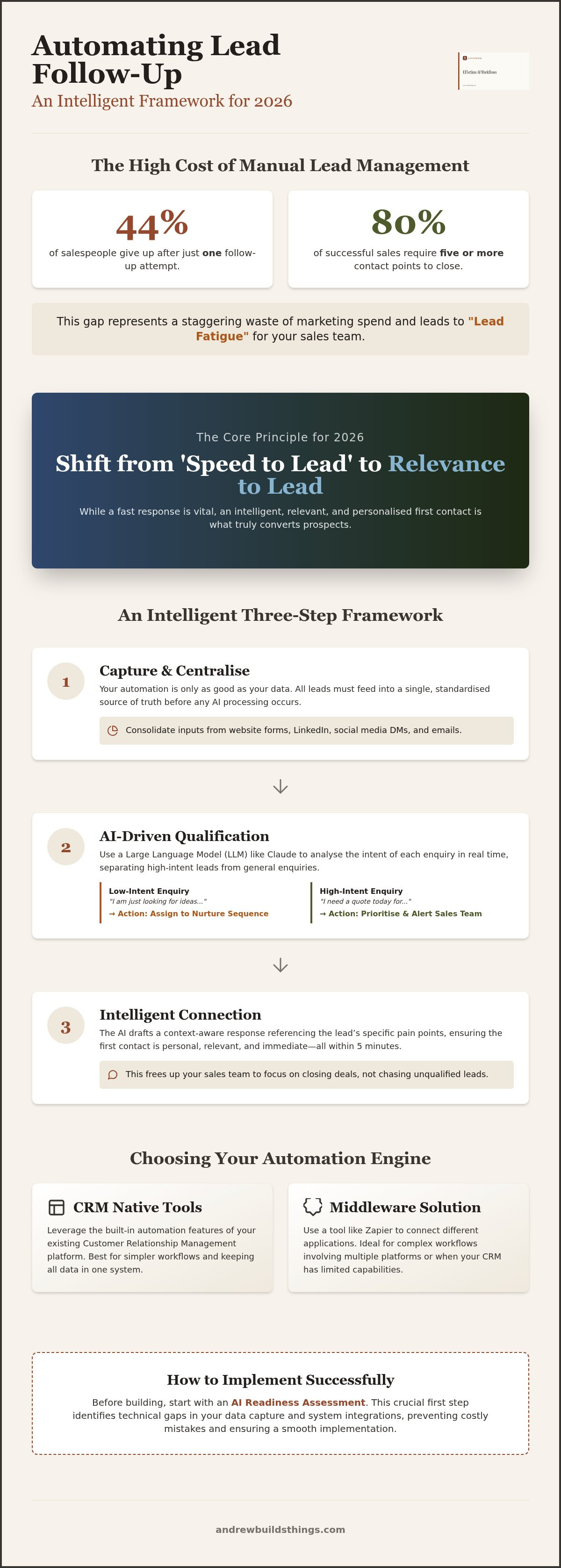
44% of salespeople give up after just one follow-up attempt, even though 80% of sales require five or more contacts to close. It's a staggering waste of marketing spend. You likely know the feeling of watching hard-earned leads go cold because your team is buried in manual admin or inconsistent messaging. You want to automate lead follow up workflows to reclaim your time, but you're rightly worried about sounding like a soulless machine. It's a valid concern; nobody wants to talk to a basic bot that doesn't understand nuance.
This article provides a pragmatic framework for 2026 to build an intelligent, AI-driven system that stops prospects falling through the cracks whilst maintaining a genuine human touch. I'll show you how to move away from manual delays and towards a "set and forget" model that qualifies leads automatically. We will explore the specific architecture needed to filter out low-quality enquiries, ensuring your sales team spends their energy on closing deals rather than chasing ghosts. By the end, you'll have a clear roadmap to increase your conversion rates and fix your pipeline for good.
Key Takeaways
-
Shift your focus from "speed to lead" to "relevance to lead" to ensure your sales team only engages with high-intent prospects.
-
Learn how to automate lead follow up workflows by integrating LLMs like Claude to analyse enquiry intent and qualify leads in real time.
-
Determine whether to use your CRM's native tools or a middleware solution like Zapier to act as the engine for your automation.
-
Start with an AI Readiness Assessment to identify technical gaps before you invest time in building complex new systems.
-
Scale your operations faster by using ready-made frameworks instead of wasting resources on custom software development.
Table of Contents
The Hidden Cost of Manual Lead Management
Most marketing operations resemble a leaky bucket. You spend thousands on ads and SEO to fill the top, only to watch high-intent enquiries drip out through the bottom because of manual delays. It isn't just about losing a name on a spreadsheet; it's about the fundamental erosion of your return on investment. When you fail to automate lead follow up workflows, you gamble on your team's ability to be perfect every single hour of every day. Humans have bad days. Systems don't.
The stakes are high. Industry data suggests that roughly 50% of sales go to the vendor who responds first. But the game has changed. Whilst being fast was once the only requirement, the modern buyer now demands relevance. Traditional Lead management methodologies often focused on the sheer volume of contact attempts. In 2026, volume without intelligence is just noise. If your follow-up is fast but generic, you aren't building a relationship, you're just ticking a box.
The 5-Minute Rule in 2026
Lead decay happens faster than ever. In a world of instant gratification, a prospect who fills out your form is likely browsing three of your competitors simultaneously. If you take an hour to reply, they've already moved on. There is a critical difference between a "holding email" and an intelligent response. A generic "we've received your enquiry" message is a digital shrug that does nothing to build brand authority. An intelligent, automated response acknowledges their specific problem and offers a concrete next step. Without choosing to automate lead follow up workflows, providing this level of detail in under five minutes is impossible for a human team to sustain consistently.
Cognitive Drain: The Silent Efficiency Killer
Manual lead management is a morale killer for sales teams. Asking a high-performing closer to spend their morning copy-pasting data or sending "just checking in" emails is a poor use of their talent. This constant context switching between CRM admin and actual selling creates "lead fatigue". Salespeople stop seeing leads as opportunities and start seeing them as chores to be cleared. This shift from "doing" to "organising" is where the real value lies. When you automate the mundane qualification steps, you protect your team's mental energy. They stay focused on closing deals rather than fighting with a database. It turns your sales process from a frantic scramble into a structured, calm, and highly efficient machine.
Building an Intelligent Follow-Up Framework
Speed is a commodity. Relevance is the differentiator. To effectively automate lead follow up workflows, you need a structure that goes beyond simple auto-responders. I break this down into three pillars: Capture, Qualify, and Connect. This isn't about sending a generic sequence. It’s about building a system that understands who is on the other side of the screen. You want to move away from "blast" marketing and towards a model that treats every enquiry as a unique conversation.
Traditional marketing automation often stops at the "Capture" phase. You get a lead, and it sits in a database until a human finds time to look at it. An intelligent framework uses Large Language Models (LLMs) like Claude to bridge the gap between getting a name and starting a conversation. This ensures your brand voice remains consistent whilst the AI handles the initial heavy lifting of drafting replies and categorising intent.
Step 1: Capture and Centralise
Your framework is only as good as your data. Leads arrive from LinkedIn, website forms, and social media DMs. If these don't feed into a single source of truth, your automation will fail. Clean data entry is non-negotiable. A common pitfall is "fragmented ingestion", where different platforms store leads in different formats. You need one central hub where every enquiry is standardised before any AI touches it. This allows you to automate lead follow up workflows without dealing with broken data fields or missing contact details.
Step 2: AI-Driven Qualification
This is where the pragmatic benefits of AI become clear. You can use Claude to "read" the specific text of a web form submission. The AI assigns a priority score based on intent. A prospect saying "I need a quote today" is a high-intent signal. Someone saying "I am just looking for ideas" suggests a longer nurturing cycle. The system performs automated sentiment analysis to identify if a prospect is ready to buy or just browsing. This stops your sales team from wasting time on tyre-kickers.
Once qualified, the AI drafts a response that references the lead’s specific pain points. This isn't a template. It is a context-aware message that feels personal and professional. Before you start building these logic chains, it is wise to run an AI Readiness Assessment to identify any gaps in your current setup. This ensures your automation is built on a solid technical foundation rather than a pile of messy spreadsheets.
Choosing Your Automation Engine: CRM vs. Middleware
Once you have defined your framework logic, you need to decide which engine will power it. This is a technical crossroads for any UK SME. You can either use the built-in tools within your CRM or build a "best-of-breed" stack using middleware. To automate lead follow up workflows with precision, you must weigh up the simplicity of a single platform against the sheer power of a connected ecosystem. The right choice depends on how much "thinking" you want your system to do.
A native approach keeps your data consolidated. A middleware approach keeps your logic flexible. For many businesses, the transition from one to the other marks the point where they stop merely collecting leads and start actually managing them. Cost is a factor, but the real price is the time lost to rigid systems that cannot adapt to your specific sales process.
Native CRM Automations
Most modern CRMs, such as Pipedrive or HubSpot, offer native automation features. These are excellent for maintaining data integrity because everything happens within a single database. You don't have to worry about API keys or data mapping between different apps. The ease of use is a significant draw; you can often set up a basic sequence in minutes without technical help.
However, native tools are frequently a "walled garden". Their AI features are often bolted on as afterthoughts and lack the deep customisation required for complex qualification. If your logic is rigid, your follow-up will feel rigid. These systems are best for simple tasks like sending a standard auto-responder or setting a task reminder for a salesperson. They often struggle when you need to send lead data to an external LLM for the deep intent analysis we discussed in the previous section.
The Middleware Approach (Zapier/Make)
Middleware platforms like Zapier or Make act as the glue between your tools. This is where you find limitless flexibility. By using middleware, you can connect your lead source directly to Claude, process the intent, and then push the personalised result back into your CRM or out via email. This approach allows you to automate lead follow up workflows that feel genuinely human because you aren't limited by what one software provider thinks you need.
The trade-off is complexity. There is a steeper learning curve, and you will face additional monthly subscription costs for the middleware itself. For a growing business, this is often the "sweet spot". You gain the ability to build intelligent qualification and multi-channel nurture sequences that your competitors, stuck with basic CRM templates, simply cannot match. It moves you from a passive database to an active, thinking sales engine.
Workflow Template: The "Intelligent Responder" Architecture
The blueprint for a modern follow-up system is tool-agnostic. Whether you choose Zapier or Make, the logic remains consistent. To automate lead follow up workflows effectively, you must move beyond simple linear sequences. The "Intelligent Responder" architecture uses AI as a decision engine, not just a message sender. It starts with a trigger, usually a new enquiry from your website or a lead magnet. Instead of a basic "thank you" email, the system immediately sends the lead data to Claude for a deep intent analysis.
Claude evaluates the submission against your specific business criteria. It looks for signals of "High Intent", such as a request for a specific quote or a mention of a tight deadline. Alternatively, it identifies "Information Seeking" leads who are merely browsing. The system then makes a choice. High-intent prospects receive a personalised email that addresses their specific pain points and offers a booking link. Simultaneously, a high-priority task is created in your CRM for a salesperson to follow up. Information seekers are routed to a longer nurture sequence, ensuring they stay in your ecosystem without clogging up your sales team's calendar.
The Logic Gate: Routing Leads Correctly
A robust system needs a gatekeeper. You must set up filters so your team only spends energy on qualified prospects. If a lead falls outside your service area or budget, the automation handles it. You can set up "referral" emails that automatically suggest a partner better suited to their needs. This maintains your brand authority whilst saving everyone's time. The goal is to ensure no enquiry is left in "automation limbo", where a prospect waits for a response that never comes because they didn't fit a specific mould. Every path must lead to a clear outcome.
The Feedback Loop: Improving Your Prompts
Automation is not a "set and forget" task. You must audit your AI’s drafted responses regularly to ensure the tone remains professional and accurate. Sales feedback is the best data source for this. If your team reports that "qualified" leads are actually poor fits, you need to refine your qualification prompt. This data shouldn't exist in a vacuum. Use the insights from your lead follow-up performance to inform your AI Search Visibility Audit. This helps you understand if you are attracting the right kind of traffic in the first place. If you want to skip the trial and error of building these systems yourself, you can access pre-built blueprints in my Framework Library.
By treating your follow-up as a living system, you automate lead follow up workflows that actually evolve. You stop being a slave to your inbox and start being the architect of your growth. It turns a chaotic manual process into a predictable, scalable asset for your business.
Implementing Your AI Workflow Successfully
Building a system on paper is easy. The reality of implementation is where the wheels usually come off. If your current lead management is a mess of spreadsheets and forgotten emails, throwing AI at it will only create automated chaos. You need to automate lead follow up workflows with a clear, staged approach that respects your existing sales culture whilst removing the friction. Execution is about discipline, not just technology.
Before you touch a single line of logic, you must understand your baseline. I always recommend starting with an AI Readiness Assessment. This isn't a box-ticking exercise. It's a technical audit to identify where your data is siloed and which manual tasks are actually ripe for automation. Once you have that clarity, don't fall into the trap of building custom software from scratch. It is expensive, slow, and usually unnecessary. Using "ready-made" frameworks from a library allows you to deploy proven logic immediately. It’s the difference between building a car from spare parts or simply turning the key and driving away.
The 30-Day Automation Roadmap
Success requires a structured timeline. You can't fix everything in an afternoon. I suggest a four-week sprint to move from manual chaos to a streamlined operation:
-
Week 1: Audit your current lead journey. Map every touchpoint from the first click to the final sale. Identify exactly where prospects go quiet.
-
Week 2: Build your first "Minimum Viable Workflow". Focus on one lead source, such as your main website contact form, and get the basic routing right.
-
Week 3: Stress-test the AI qualification logic. Feed the system real-world edge cases to see if Claude understands your "Ideal Customer Profile". Adjust the prompts based on these results.
-
Week 4: Scale to all lead sources. Connect your social media enquiries and ad platforms to the same central engine.
Beyond Follow-Up: Scaling Your AI Library
Once you have plugged the gaps in your follow-up process, you can look at the wider marketing operation. A scalable AI workflow library can handle everything from content repurposing to customer onboarding. This is also the time to ensure your brand remains visible in AI-driven search results. If AI agents are the ones researching products in 2026, your business must be the answer they find. You aren't just building a follow-up tool; you are building a future-proof marketing engine. Stop guessing and start building. Book your AI Readiness Assessment today to find the quickest path to a "set and forget" system that actually works. When you automate lead follow up workflows properly, you don't just save time. You buy back the freedom to focus on the high-value deals that actually grow your business.
Stop the Leaks and Scale Your Pipeline
The gap between a lead and a sale is often just a matter of timing and relevance. You've seen how manual delays and generic messaging act as a tax on your marketing spend. By choosing to automate lead follow up workflows, you move from a reactive scramble to a proactive, intelligent sales operation. We've covered the transition from basic CRM triggers to sophisticated AI qualification using middleware and LLMs like Claude.
This isn't about complex custom coding; it's about using practical, ready-made frameworks designed for measurable marketing efficiency. As a UK technology leader, Andrew Builds Things focuses on stripping away the hype to deliver systems that actually work for SMEs. You don't need a massive technical team to stop prospects from falling through the cracks. You just need a solid foundation.
The first step is identifying where your current system is failing. Get your AI Readiness Assessment and start automating today. It’s time to stop the manual admin and start closing the deals that matter. Your future pipeline will thank you.
Frequently Asked Questions
How do I ensure automated emails do not sound robotic?
Use Large Language Models like Claude to inject specific context from the lead's enquiry into your responses. Avoid generic templates that offer no value. By using an intelligent architecture, you can reference the prospect's exact pain points in the first paragraph. This makes the message feel like a direct reply rather than a script. Always include your brand voice guidelines in the prompt to maintain a consistent, human tone across every touchpoint.
Which is better for lead follow-up: Zapier or Make?
Zapier is generally better for beginners due to its intuitive interface and massive app library. Make offers deeper flexibility and is often more cost-effective for high-volume tasks, but it has a steeper learning curve. Most UK SMEs find Zapier sufficient to automate lead follow up workflows without needing advanced technical skills. The choice depends on your internal capacity to manage complex logic versus your need for speed.
Do I need a developer to automate my lead follow-up workflows?
You don't need a developer if you use ready-made frameworks and middleware. These tools are designed for marketers to build systems without writing code. Whilst custom software development is a separate service I don't provide, my Framework Library offers pre-built blueprints you can deploy immediately. This no-code approach allows you to own your systems without being reliant on expensive external technical support for every minor change or update.
Can AI really qualify leads as well as a human can?
AI is exceptionally good at the initial heavy lifting of qualification. It can analyse intent, sentiment, and budget signals faster than any human. Whilst a person is needed for the final closing conversation, AI can filter out the high volume of low-quality enquiries that typically go ignored. It ensures your sales team only speaks to high-intent prospects, which significantly improves morale and protects your team's mental energy for high-value tasks.
How much does it cost to implement an automated follow-up system?
Costs vary based on your existing software stack. A basic setup using Pipedrive Growth at £39 per seat or HubSpot Starter at roughly £15 per seat, combined with a middleware tool like Zapier, is affordable for most small businesses. You should also factor in the initial investment for an AI Readiness Assessment to ensure your strategy is sound. This prevents you from wasting money on complex tools you don't actually need.
What happens if the AI sends an incorrect response to a lead?
You must audit your AI’s drafted responses regularly to prevent errors. No system is perfect, so start by setting your automation to draft mode. This allows a human to approve the message before it reaches the prospect. Over time, as you refine your prompts based on real-world feedback, you can move towards full automation. It is about building trust in the logic through a consistent and structured feedback loop.
How does lead follow-up automation impact my CRM data quality?
Automation significantly improves CRM data quality by removing manual entry errors. When you automate lead follow up workflows, every enquiry is standardised and categorised before it enters your database. This centralisation ensures that contact details, source information, and intent scores are always accurate. It turns your CRM from a messy dumping ground into a reliable source of truth that actually informs your future marketing decisions and growth strategy.
Will automating my follow-up improve my conversion rates immediately?
You will see a rapid improvement in speed to lead, which is a primary driver of conversion. Research shows companies that automate follow-up can see a 10% or more increase in revenue within six to nine months. Whilst the technology is fast, the real results come from the consistency of your messaging. By ensuring every lead receives five or more contacts, you overcome the common failure where salespeople give up too early.